
Creating Custom Coaching Dashboards for Enhanced Client Experience
A coaching dashboard can either feel like a cold admin layer or become the place where clarity, trust, momentum, and client ownership come together. The difference is not in how many widgets you add. It is in whether the dashboard helps clients see what matters, remember what they committed to, notice progress early, and stay connected to the coaching process between sessions. When designed well, a custom dashboard becomes part accountability system, part reflection space, part progress mirror, and part confidence builder.
That matters because many clients do not fail from lack of potential. They lose traction because goals become abstract, wins get forgotten, action steps scatter across messages and notes, and emotional patterns go unnoticed until they become setbacks. A strong dashboard solves those pain points. It gives coaching structure a visible home, reduces client overwhelm, and elevates the overall experience from “weekly conversations” to an organized growth environment that actually supports change.
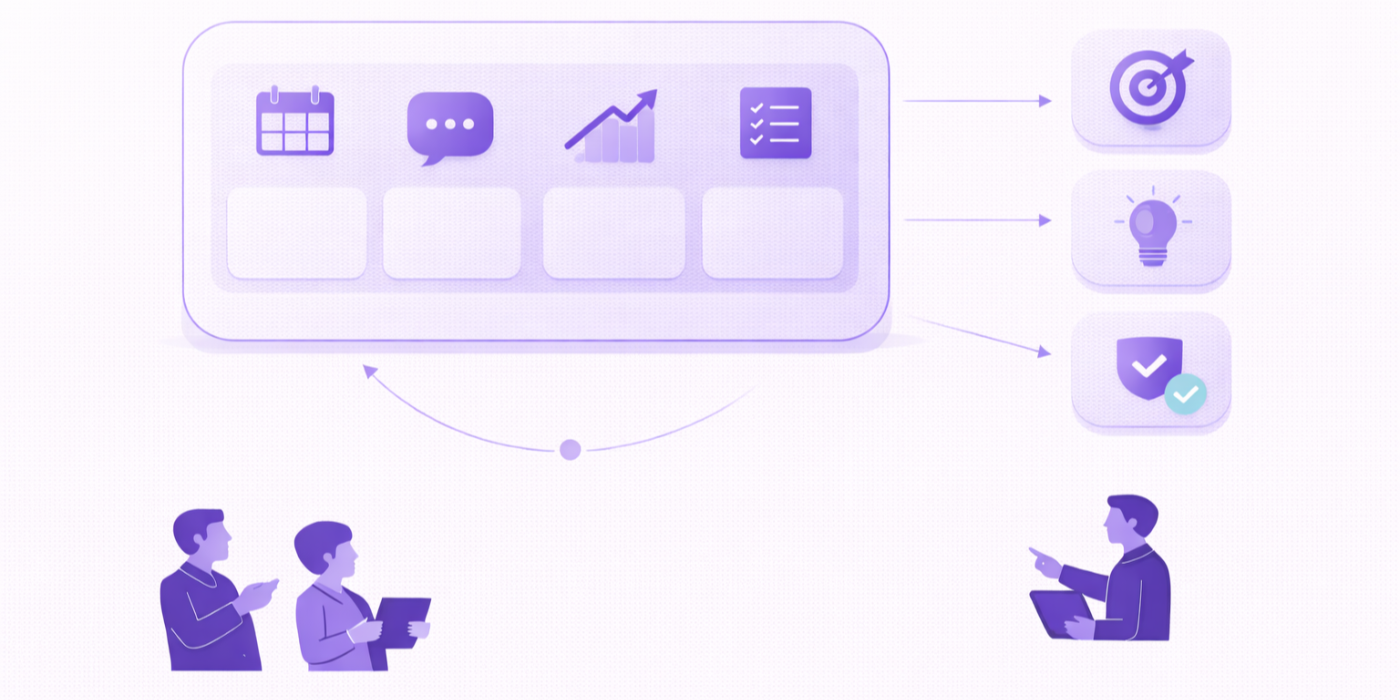
1. Why custom coaching dashboards dramatically improve the client experience
Most clients are not overwhelmed because they have no ambition. They are overwhelmed because too many important things live in too many places. Session notes are in one document. commitments are in another. reminders are buried in email. emotional patterns are discussed verbally and then lost. wins go untracked. stalled habits get noticed too late. When that happens, coaching can still feel helpful, but it stops feeling integrated. This is exactly why a custom dashboard matters. It creates one visible environment where goals, check-ins, reflections, progress signals, and next actions can live together in a way clients can actually use.
A great dashboard reduces cognitive drag. Clients do not need to wonder what they are working on, what they said they would do, what has improved, or what needs attention this week. The dashboard answers that. It turns coaching from a memory-based process into a system-based one, which is especially useful when your practice already values coaching session templates to boost your productivity instantly, building your coaching toolkit: essential templates and checklists, creating a coaching resource library your clients will love, and free & premium coaching resources to boost your practice.
The deeper value is emotional, not just organizational. Clients feel more supported when progress is visible. A dashboard can show streaks, recent wins, confidence trends, values alignment, completed exercises, upcoming focus areas, and unresolved blockers. That visibility matters because many clients underestimate their own growth when results are not obvious yet. They remember what they missed more than what they changed. A dashboard corrects that distortion by making evidence hard to ignore. That aligns naturally with how the worlds best coaches get results, how to actually empower clients real results, the 1 coaching technique for client breakthroughs, and why trust is the most valuable asset in coaching.
Dashboards also improve follow-through because they shrink the distance between insight and action. In many coaching relationships, the session is strong but the week between sessions is weak. The client leaves with clarity, then returns to a chaotic environment that does not support execution. A good dashboard carries the coaching structure into real life. It can hold simple action cards, habit prompts, decision logs, boundary reminders, reflection questions, and recap sections that keep the client oriented. This is especially valuable when paired with how to inspire clients to take immediate action, effective strategies for reinforcing positive client behaviors, interactive coaching exercises to keep clients motivated, and how to make it work every time.
Another major benefit is personalization. Generic client portals often feel administrative. A custom dashboard can reflect the client’s actual goals, emotional patterns, preferred style of reflection, workload, and stage of growth. One client may need a minimal weekly reset view. Another may need a richer system with journaling, habit tracking, decision review, and confidence scoring. This is where dashboards become part of enhanced client experience rather than just digital clutter. They show clients that the coaching container was designed around them, not forced on them.
The best dashboards do not overwhelm. They reduce noise, spotlight priorities, and make progress easier to sustain. In that sense, they are not just tech. They are coaching design made visible.
| Client Need | Dashboard Element | What It Shows | Start With | Best For |
|---|---|---|---|---|
| Clarity | Weekly focus card | Top priority for the week | 1 focus only | Overwhelmed clients |
| Consistency | Habit tracker | Core habits and completion | One habit | Inconsistent clients |
| Follow-through | Action-step board | Session commitments and due dates | 3 actions max | Busy professionals |
| Motivation | Wins log | Completed efforts and progress signals | 3 wins weekly | Self-critical clients |
| Self-awareness | Mood check-in tile | Emotions, stress, confidence, energy | Daily score | Emotionally reactive clients |
| Reflection | Weekly recap form | Wins, misses, lessons, blockers | 4 prompts | Accountability coaching |
| Trust | Shared session summary | Key takeaways and next steps | After each session | Clients who forget details |
| Engagement | Prompt of the week | Single reflection question | 1 question | Clients needing momentum |
| Decision-making | Decision journal | Options, fears, values, next move | Major decisions only | Overthinkers |
| Identity growth | Evidence of becoming section | Proof of new behaviors | 2 entries weekly | Confidence rebuilding |
| Boundaries | Boundary review panel | Where they said yes or no | 1 review weekly | People-pleasers |
| Burnout prevention | Energy tracker | Drain vs restore patterns | Rate 1-10 | Overextended clients |
| Client ownership | Self-rating section | Confidence, discipline, alignment | 3 scores | Clients who rely too much on coach |
| Focus | Priority filter | What matters now vs later | Now/next/later | Scattered clients |
| Emotional regulation | Trigger log | What triggered stress or avoidance | 1 trigger pattern | Reactive clients |
| Planning | Calendar alignment view | Goals compared with real schedule | Weekly glance | Time-poor clients |
| Retention | Milestone tracker | Program phases and achievements | 3 milestones | Longer programs |
| Communication | Question parking lot | Questions between sessions | Open text field | Clients with many moving parts |
| Confidence | Strength evidence log | Examples of courage and progress | 2 weekly | Imposter-syndrome clients |
| Recovery | Reset plan section | What to do after off-track weeks | Simple reset checklist | All-or-nothing thinkers |
| Learning retention | Resource hub | Tools, worksheets, recordings | Top 5 assets | Education-heavy coaching |
| Reflection depth | Journal shortcut buttons | Fast access to prompts and entries | 3 prompt types | Reflective clients |
| Values alignment | Values scoreboard | How behavior matched values | 5 values max | Purpose-driven clients |
| Session quality | Pre-session check-in | What matters most before the call | 3 questions | Clients who ramble |
| Behavior change | Micro-commitment tile | Smallest next action | 1 micro-step | Avoidant clients |
| Emotional safety | Consent and boundaries note | How the client wants support | Simple preferences | Sensitive clients |
| Progress review | Monthly dashboard summary | Patterns, themes, gains, priorities | Month-end review | Transformation programs |
| Relationship support | Conversation prep card | What to say, ask, own, request | Before hard talks | Conflict-avoidant clients |
| Personalization | Client language panel | Their words for goals and pain points | Favorite phrases | All clients |
| Momentum | Streak visibility card | Consecutive completions | Only key behaviors | Habit-based coaching |
| Long-term self-trust | Promises kept log | Commitments made vs honored | Weekly review | Clients rebuilding self-respect |
2. What to include in a coaching dashboard so it feels useful instead of cluttered
A dashboard should not be built around everything a coach could track. It should be built around what the client actually needs to see, use, and revisit. That means starting with coaching outcomes, not software possibilities. If a dashboard becomes crowded with graphs, tabs, and admin layers, clients disengage. They stop visiting it, then stop relying on it, and eventually the dashboard becomes a decorative object rather than an active support tool. The best systems are selective. They prioritize clarity, emotional relevance, and actionability over visual complexity.
The first must-have section is the “what matters now” layer. This can be a weekly focus card, top goal summary, or current phase marker. Clients need immediate orientation the second they open the dashboard. They should know what this week is about, what success looks like, and what deserves attention first. That principle fits beautifully with smart goals 2.0: how top coaches set & achieve client goals, the wheel of life reinvented: strategies for coaching mastery, powerful questioning techniques that transform coaching sessions, and new data proven coaching methods for maximum client success.
The second key layer is visible progress. Clients need proof. That can come through wins logs, completed actions, milestone bars, habit consistency, journal patterns, or even a simple weekly self-rating trend. The important thing is that the dashboard shows movement in a way clients can interpret quickly. Too many clients live inside the pain of not being “there yet.” A progress layer reminds them they are no longer where they started. This is especially useful when the work involves how to actually change your clients life in 2026, how one method is revolutionizing coaching, why coaches are embracing this positive change model, and the positive psychology framework is revolutionizing coaching in 2026.
The third essential layer is accountability. This is where many dashboards either become too controlling or too vague. A good accountability section tracks agreed actions, not imposed pressure. It helps clients remember commitments, review completion, and learn from misses without shame. A simple “committed / completed / blocked / next adjustment” structure is usually more effective than a rigid performance board. It protects honesty while still supporting follow-through.
The fourth element is reflection access. This may include weekly recap forms, journal prompts, emotional check-ins, decision logs, or boundary reviews. Clients do not only need to act; they need to interpret what is happening. Without reflection, dashboards become productivity tools only. Coaching, however, requires both movement and meaning. This is why dashboards pair so well with daily journaling prompts: the ultimate 2026 guide for coaches, gratitude journal coaching: the ultimate 2026 guide for coaches, life mapping: the ultimate 2026 guide for coaches, and coaching case study templates: demonstrating your value effectively.
The fifth layer is support assets. A resource hub, session recordings, worksheets, prompt libraries, or short “use this when…” tools can make the dashboard feel alive between sessions. This is especially valuable for clients who forget techniques when stress spikes. A dashboard can become the place they go when they need a reset, a reframe, or a practical next step instead of spiraling alone.
If a component does not help the client decide, remember, reflect, or act, it probably does not belong. Utility is what makes a dashboard sticky. Relevance is what makes it trusted.
3. How to build custom dashboards around real client pain points, not generic features
The strongest coaching dashboards are not feature-rich. They are pain-point precise. That means you do not begin by asking, “What would look impressive?” You begin by asking, “Where do this client’s weeks fall apart?” That question changes everything. Maybe the client loses momentum after missing one habit. Maybe they forget breakthroughs two days after the session. Maybe they say yes when they mean no. Maybe they confuse emotional exhaustion with laziness. Maybe they avoid hard conversations until resentment takes over. A dashboard that directly addresses those pain points will always outperform a generic productivity center.
For a client who struggles with follow-through, the dashboard should reduce friction around action. Keep it lean. Show one priority, one micro-commitment, one blocker prompt, and one reset pathway. They do not need ten tabs. They need a system that makes action feel possible on hard days. That lines up with the radical simplicity coaches are loving, why this skill determines your coaching success, the coaching skill you didnt know you needed, and how coaches reach mastery.
For a client who struggles with emotional awareness, the dashboard should include lightweight self-observation tools. A mood tile, body-signal check-in, trigger log, and weekly reflection prompt can be enough. What matters is that the system helps them notice before the pattern becomes a problem. These clients often do not need more advice. They need better visibility into themselves. This connects naturally with effective listening techniques that transform client conversations, building deep trust: how to strengthen your client relationships, mindfulness and meditation techniques for emotional coaching, and inner critic management techniques: the ultimate 2026 guide for coaches.
For a client whose main issue is self-trust, the dashboard should focus on evidence. Wins logs, promises kept, recovery after setbacks, and “proof of becoming” sections can be game-changing. These clients are often blind to progress and hyper-aware of failure. If the dashboard only shows tasks, it may deepen that problem. If it shows integrity in action, it starts rebuilding identity. This is where the dashboard becomes therapeutic in feel without becoming therapy in role, which is a crucial distinction for ethical coaches.
For a client dealing with burnout, stress, or overload, the dashboard should not become another performance board. It should become a regulation-friendly environment. Fewer tasks. More signal. Clear recovery prompts. energy tracking. simple focus. compassionate reset language. It must help the client return to themselves, not feel measured by another system. This approach respects the spirit of the importance of self-care coaching for client mental health, effective strategies for coaching clients through burnout, stress management techniques every coach should know, and helping clients manage work-life balance successfully.
The core rule is simple: every block on the dashboard should solve a recurring client struggle. If you cannot name the pain point a feature addresses, leave it out. A custom dashboard only becomes valuable when it feels like it was built from the inside of the client’s real life rather than the outside of a software template.
4. The best dashboard layouts, sections, and workflows for a premium coaching experience
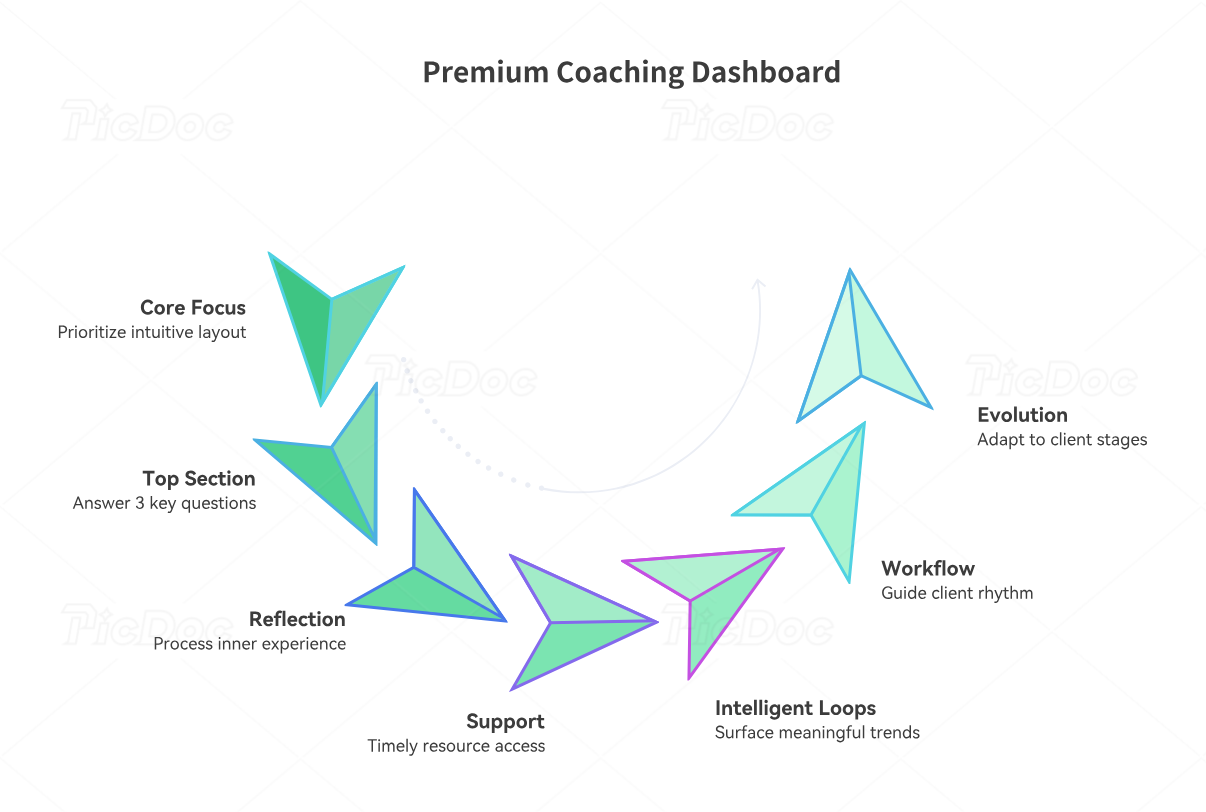
Premium client experience does not come from making a dashboard prettier than everyone else’s. It comes from making it easier to think, act, reflect, and recover inside your coaching process. Layout is part of that. If the dashboard makes clients work to figure out where to start, what changed, or what matters now, the experience degrades immediately. Great layout feels intuitive. It reduces decision fatigue and subtly communicates, “You are held here.”
The best layout usually starts with a top section that answers three questions: What is my current focus? What do I need to do next? What progress is visible right now? Those answers should appear without scrolling. A weekly focus card, one or two action tiles, and a recent wins panel are often enough. This kind of layout is especially powerful when combined with best coaching software & platforms for client management in 2025, virtual coaching tools boosting your remote session effectiveness, how technology is completely transforming the coaching industry, and the future model every coach needs to adopt by 2026.
The second section should usually hold the reflection workflow. This is where the dashboard becomes more than a task board. A weekly recap, mood check-in, journal shortcut, or decision review area helps the client process their inner experience, not just external performance. If sessions keep revisiting the same confusion, this layer is often missing. Clients need a place where patterns become visible between sessions rather than only in retrospect during them.
The third section should house support resources. This may include worksheets, checklists, replay notes, journal prompts, session recordings, conversation prep templates, or short reset guides. The goal is not to dump content. It is to give clients timely access to exactly what they need when life gets messy. This complements client session recording tools: the ultimate 2026 guide for coaches, zoom & video conferencing best practices: the ultimate 2026 guide for coaches, automated email sequences: the ultimate 2026 guide for coaches, and the 10 best coaching apps every professional should know.
The fourth section is where premium dashboards outperform generic ones: intelligent review loops. This can include weekly summaries, monthly pattern reviews, values alignment trends, confidence score snapshots, or “what keeps helping / what keeps hurting” logs. These loops make the dashboard feel alive because the system is learning with the client. Instead of just storing information, it surfaces meaning over time.
Workflow matters as much as layout. A client should know what to do before a session, after a session, and in the middle of a hard week. For example, before a session they complete a short check-in. After the session they see the recap and three action steps. During the week they use the mood tile, wins log, and blocker prompt. At the end of the week they complete a reflection form. That rhythm turns the dashboard into part of the coaching journey rather than an optional extra.
A premium dashboard is not static. It evolves with the client. Early stages may focus on clarity and consistency. Mid-stage coaching may emphasize patterns, decisions, and deeper self-trust. Later stages may highlight leadership, identity, and long-term maintenance. When the dashboard changes with the client, the experience feels custom because it truly is.
5. How to keep a coaching dashboard simple, sustainable, and worth using every week
The most impressive dashboard is useless if nobody opens it after week two. Sustainability matters more than sophistication. Many coaches build systems that are too elaborate to update and too heavy for clients to maintain. Then the dashboard becomes stale. Once information feels outdated, trust collapses quickly. Clients stop relying on it because the system no longer reflects reality. That is why the best dashboards are designed for consistency first.
Start with the smallest useful version. One weekly focus card, one action list, one check-in, one wins section, and one resource area can already create major value. Coaches often assume premium means more. In practice, premium often means cleaner. Clients trust systems that feel manageable, current, and relevant. That same spirit lives inside curating the perfect coaching toolkit for every niche, creating a coaching resource library your clients will love, how to build an interactive coaching community online, and best practices for creating interactive coaching workshops.
Next, make updating easy for both coach and client. If a component takes too much manual effort, it will eventually decay. Favor repeatable templates, quick-entry prompts, clear labels, and predictable weekly routines. A dashboard should support the coaching process, not become a second job. This is particularly important for coaches scaling their practice, offering group programs, or working with clients who already feel digitally overloaded.
You should also separate “must update” from “nice to update.” Session recap, next actions, and one check-in may be essential. A quote block, visual graph, or resource category might be optional. Knowing the difference prevents dashboard bloat. It also helps maintain the quality of the most important areas rather than spreading effort too thin across everything.
Client behavior should shape dashboard evolution. Watch where they engage. Do they use the journal shortcuts but ignore the milestone board? Do they complete the weekly reset but never touch the resource hub? Do they respond strongly to the wins log? Those signals matter. A custom dashboard should become more customized over time, not less. Remove dead weight. strengthen what actually helps. This mirrors the logic behind how to create engaging coaching content clients love, gamification tools coaches are using for maximum engagement, why theyre changing the game for coaches, and the future of client engagement 2026.
Finally, use the dashboard inside your coaching, not beside it. Reference it live. Pull patterns from it. Celebrate from it. Adjust plans through it. When the client sees the dashboard shaping the conversation, the system becomes part of the relationship rather than a forgotten add-on. That is what makes it worth using every week.
6. FAQs
-
At minimum, include a current focus section, next action steps, a quick reflection or check-in area, and a place to track visible progress. Those four pieces usually create the core value: clarity, accountability, self-awareness, and momentum. Once that foundation is working, you can layer in resources, journaling, milestone review, or values tracking. Starting lean is usually better than launching with a bloated system that clients never fully use.
-
A generic portal stores information. A coaching dashboard supports transformation. The difference is intentional design. A real coaching dashboard does not just hold files or appointment details. It highlights priorities, captures progress, reflects patterns, and guides what the client should do next. It feels less like admin and more like an active growth environment. That is why dashboards fit so well with balancing human touch with coaching automation for optimal results, wearable technology preparing your coaching business for the future, leveraging wearable tech for next-level client coaching, and how blockchain technology could radically change coaching.
-
Limit visible priorities, reduce unnecessary sections, and tie each component to a real client pain point. A dashboard should answer, not multiply, the client’s mental load. Keep the opening view simple. Use one weekly focus, a short action list, and only the most relevant reflection tools. Add complexity only when client behavior proves they will benefit from it. Simplicity is often what makes a system feel supportive.
-
No. They are valuable in both online and hybrid coaching, and even in some in-person models. The dashboard becomes the between-session support layer. It helps retain context, reinforce action, and keep the client connected to the work outside the live conversation. In-person coaching often benefits just as much from a shared digital space because real behavior change happens between meetings, not only during them.
-
The biggest mistake is building for features instead of outcomes. Coaches add tools they think should be useful rather than solving the actual breakdowns their clients experience. The result is often clutter, low engagement, and unnecessary upkeep. A dashboard earns its place when every section reduces friction, increases visibility, or improves client follow-through in a tangible way.
-
Yes, significantly. A strong dashboard increases perceived value because clients can see the structure, personalization, and continuity of the coaching process. It also improves retention because clients feel supported between sessions, not abandoned between calls. When progress is visible, action is organized, and the coaching system feels designed around their reality, clients are more likely to stay engaged and keep moving forward.
