
Voice-assisted coaching is creating new opportunities for practitioners to extend client support beyond scheduled appointments through smart speakers, smartphones, automated reminders, and voice-activated routines. By integrating Alexa and Siri with health behavior change strategies, coaches can reduce everyday barriers that undermine client consistency. These technologies complement accountability coaching, strengthen habit formation, and expand the practical applications of micro-coaching. Their greatest potential lies in delivering timely behavioral support while allowing coaches to build more accessible, personalized, and operationally scalable services without sacrificing professional relationships or client autonomy.
1. What Is Voice-Assisted Coaching and Why Does It Matter?
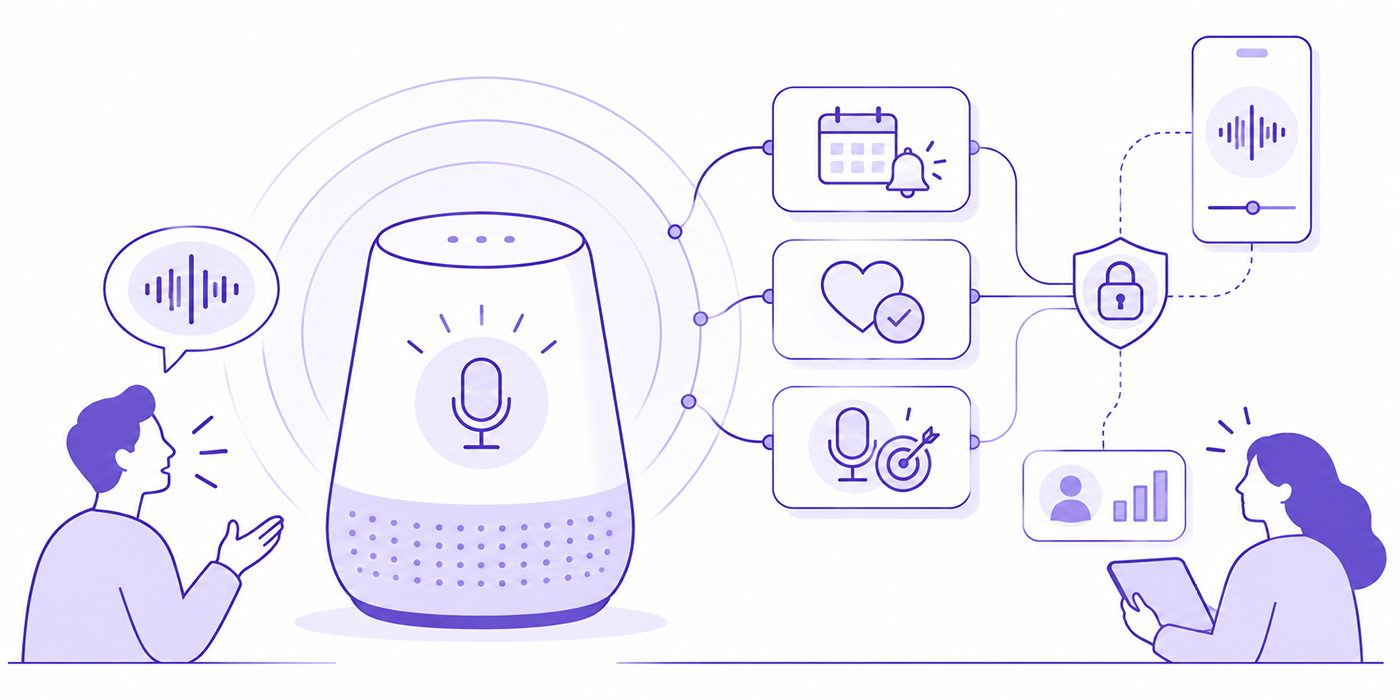
Voice-assisted coaching integrates voice-enabled digital assistants into professional coaching programs to facilitate goal reminders, behavioral prompts, structured routines, self-monitoring, and access to predetermined resources. Clients interact through spoken commands, reducing the effort required to navigate applications, open dashboards, or locate written action plans.
The growing intersection between coaching technology and transformational coaching creates opportunities to address the gap between understanding a behavioral strategy and implementing it consistently. Practitioners can combine voice interactions with habit stacking techniques and structured SMART goals to make agreed actions easier to initiate.
Solving the Between-Session Accountability Problem
A client may attend a productive coaching session on Monday, encounter an unexpected workload on Wednesday, and completely abandon their behavioral commitments by Friday. Their next appointment becomes another troubleshooting exercise, consuming time that could have supported progression.
Voice assistants introduce an additional support channel during these intervals. A scheduled reminder before a predictable obstacle, a voice-activated checklist, or an easily accessible reflection prompt can reinforce decisions established during coaching sessions.
This delivery model strengthens client accountability systems, supports effective client expectation management, and provides practical applications for self-care coaching and career burnout coaching.
Understanding Three Levels of Voice-Assisted Coaching
Coaches can implement voice technology through three progressively sophisticated levels:
Level 1: Native voice assistance. Clients use existing Alexa or Siri functions to establish reminders, timers, calendar events, and task lists. This requires minimal technical investment.
Level 2: Structured voice workflows. Coaches develop reusable instructions for Alexa Routines or Apple Shortcuts that combine multiple actions around a behavioral objective.
Level 3: Integrated conversational systems. Custom applications or supported voice integrations provide structured check-ins, personalized content, and connections to authorized coaching platforms. These require additional development, security assessment, and maintenance.
Practitioners exploring AI-assisted health coaching should begin with the lowest-complexity system capable of addressing the client's problem. This approach also supports holistic coaching, responsible professional development, and economically sustainable online coaching businesses.
What Does Research Say About Voice-Based Behavioral Support?
Research into conversational agents and voice-enabled health interventions identifies promising applications in behavioral engagement, self-management, physical activity, and accessibility. However, differences in study design, intervention quality, participant characteristics, and follow-up periods limit conclusions about long-term effectiveness.
Coaches should evaluate whether voice assistance improves specific behavioral outcomes for their own clients. The availability of advanced conversational technology provides an opportunity for experimentation, with effectiveness determined through actual performance measurement.
2. Alexa vs. Siri for Coaching: Which Platform Should Coaches Use?
Selecting a voice assistant requires evaluating the client's existing devices, daily environment, accessibility requirements, privacy preferences, and willingness to configure new workflows.
The strongest technology strategy integrates naturally with the client's lifestyle. Introducing unnecessary devices or complicated onboarding can undermine the benefits of behavioral change coaching, increase resistance identified through the Immunity to Change model, interfere with goal achievement, and complicate client engagement.
Amazon Alexa: Environment-Based Coaching Support
Alexa is particularly useful when coaching objectives are connected to recurring activities within a client's home or workspace. Alexa Routines can combine compatible actions and activate through scheduled triggers, voice commands, or supported smart-home events.
A client could configure a morning routine that delivers a neutral reminder, starts a preparation timer, and performs compatible environmental adjustments.
Useful applications include:
Morning and evening routine reinforcement.
Scheduled movement or recovery prompts.
Hands-free access to simple reminders.
Household preparation checklists.
Preconfigured motivational or educational content.
Timed focus and reflection activities.
Coaches specializing in preventive health coaching, lifestyle medicine coaching, metabolic health coaching, and holistic wellness can use these capabilities to reinforce previously established behavioral commitments.
Shared household environments require additional caution because spoken reminders may be overheard. Neutral wording and individually controlled notification settings can reduce unnecessary disclosure.
Apple Siri: Personal and Mobile Coaching Support
Siri integrates with compatible Apple applications and supports voice activation of workflows created through the Shortcuts app. Clients can use Reminders, Calendar, timers, and authorized third-party applications to access coaching-related activities throughout the day.
Siri may be particularly suitable for mobile professionals whose commitments occur across multiple environments. A configured shortcut can open a progress worksheet, display a client-selected checklist, or initiate an approved routine.
These applications complement leadership coaching, conscious leadership development, public speaking preparation, and career burnout management.
A Practical Platform Selection Framework
Assess each client's suitability using five criteria:
Device ownership: Can the client implement the workflow without buying additional hardware?
Context suitability: Does the assistant operate where the target behavior usually occurs?
Accessibility: Can the client comfortably use spoken commands or alternative input methods?
Privacy: Can reminders and stored information be managed without unnecessary disclosure?
Reliability: Does the workflow perform consistently under the client's actual conditions?
A client experiencing difficulty maintaining an evening routine at home might benefit from an Alexa-based workflow. A consultant moving between meetings could find Siri more convenient.
Practitioners developing culturally competent coaching services should also evaluate language recognition, speech differences, environmental noise, and access to alternative interfaces.
3. How Coaches Can Use Voice Technology to Improve Client Outcomes
Voice-assisted coaching becomes valuable when each technological interaction addresses an identifiable behavioral obstacle. Designing workflows around client problems produces clearer objectives and more meaningful outcome measurements.
Deliver Behavioral Prompts at the Point of Action
A reminder delivered several hours before an intended behavior may lose relevance by the time the client encounters the actual decision. Contextual prompts aim to reduce this delay by appearing close to the intended action.
For example, a client working toward improved physical activity might establish a reminder immediately following their usual lunch break. Connecting the action with an existing routine reinforces habit stacking, while micro-coaching techniques help maintain manageable commitments.
Practitioners can incorporate the T-GROW coaching model and OSCAR coaching framework to ensure automated prompts remain connected to client-selected goals.
Build Voice-Activated Recovery Protocols
Clients frequently abandon behavioral programs after encountering disruptions. A missed morning routine becomes a missed day, followed by declining confidence and withdrawal from the program.
A preconfigured recovery workflow can help clients access an agreed fallback action. An Apple Shortcut named Daily Reset, for example, could open a checklist containing three client-selected tasks:
Review the original commitment.
Choose its minimum viable alternative.
Schedule the next realistic opportunity.
This approach supports emotional agility, self-confidence coaching, positive psychology, and positive intelligence practices.
The assistant delivers the predetermined workflow while the human coach evaluates persistent barriers, adjusts objectives, and facilitates reflective conversations.
Introduce Structured Voice-Enabled Reflection
Clients often struggle to remember the circumstances surrounding behavioral setbacks when discussing them several days later. Immediate reflection can capture useful contextual details while experiences remain relatively fresh.
A voice-activated shortcut can open an approved reflection form containing questions such as:
What action did I intend to complete?
What prevented me from completing it?
Which adjustment could improve my next attempt?
What support would make the action more manageable?
Sensitive responses should be entered through an appropriately protected system. Consumer voice assistants should generally be reserved for launching resources or delivering neutral prompts.
Combining this workflow with constructive coaching feedback, emotional intelligence coaching, the CLEAR coaching model, and psychologically safe coaching environments creates a stronger foundation for individualized interventions.
Prevent Reminder Fatigue Through Intelligent Scheduling
Repeated notifications can become disruptive, especially when clients receive overlapping reminders from productivity applications, calendars, wearable devices, and messaging platforms.
Coaches should establish a conservative notification schedule and increase frequency only when the client identifies a genuine need.
A practical starting protocol includes one priority behavior, one reminder per intended opportunity, and one weekly review. During the review, determine whether prompts were useful, ignored, inconvenient, or emotionally burdensome.
This supports professional duty of care and protects the collaborative relationship from inappropriate automation-driven pressure.
4. A 30-Day Implementation Framework for Voice-Assisted Coaching
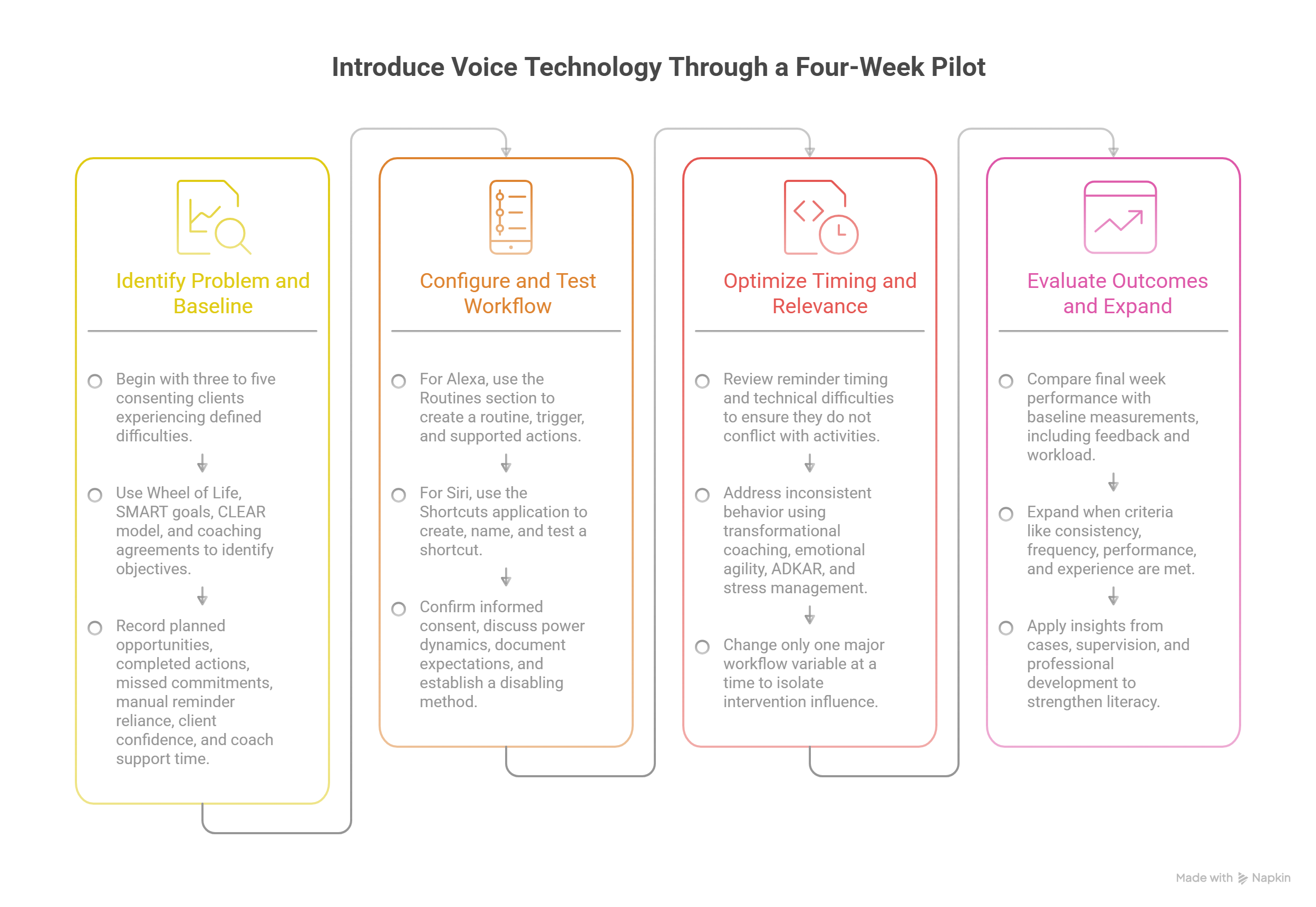
Coaches can introduce voice technology through a controlled four-week pilot supported by baseline measurement, informed participation, structured testing, and outcome evaluation.
Days 1–7: Identify the Behavioral Problem and Establish a Baseline
Begin with three to five consenting clients who experience a clearly defined difficulty, such as forgetting agreed activities, missing weekly reflections, or struggling to maintain predictable routines.
Use the Wheel of Life assessment, SMART goal framework, CLEAR coaching model, and established coaching agreements to identify suitable objectives.
Record the following information before introducing automated support:
Number of planned behavioral opportunities.
Number of successfully completed actions.
Primary reasons for missed commitments.
Current reliance on manual coach reminders.
Client confidence in completing the behavior independently.
Time spent by the coach providing between-session support.
This baseline establishes a practical reference point for evaluating subsequent changes.
Days 8–14: Configure and Test One Voice Workflow
For Alexa users, open the Alexa application, locate the Routines section, create a routine, choose an available activation trigger, and configure appropriate supported actions. Test the complete routine on the intended device.
For Siri users, open the Shortcuts application, create a shortcut, add an available action such as opening an approved resource, assign a recognizable name, and test activation through Siri.
Before deployment, confirm informed client consent, discuss relevant coaching power dynamics, document expectations within the professional code of conduct, and establish a clear method for disabling the workflow.
Implementation example: A client who regularly forgets their evening preparation routine establishes a single neutral voice reminder at 7 PM. The coach monitors preparation completion through an existing approved check-in process.
Days 15–21: Optimize Timing, Accessibility, and Behavioral Relevance
Review whether reminders occur at useful times and whether clients encounter technical difficulties. A prompt delivered during a meeting, commute, or family activity may require rescheduling.
If the behavior remains inconsistent, explore underlying barriers through transformational coaching, emotional agility techniques, the ADKAR change management model, and relevant stress management strategies.
Change only one major workflow variable at a time. Adjusting reminder frequency, timing, wording, and behavioral difficulty simultaneously makes it difficult to identify which intervention influenced performance.
Days 22–30: Evaluate Outcomes and Decide Whether to Expand
Compare the final week's behavioral performance with baseline measurements. Include client feedback and coaching workload alongside adherence data.
Consider expanding the workflow when it meets mutually agreed criteria, such as improved behavioral consistency, manageable notification frequency, reliable technical performance, and positive client experiences.
Practitioners can apply insights from successful coaching transformation cases, participate in coach supervision, and strengthen their technology literacy through continuing professional development.
A small pilot demonstrates operational feasibility and preliminary outcomes. Establishing causality or general effectiveness requires more rigorous evaluation.
5. Privacy, Profitability, and Professional Boundaries in Voice-Assisted Coaching
The commercial potential of voice-assisted coaching depends on its ability to reduce repetitive administrative work while maintaining appropriate privacy protections, professional judgment, and individualized client support.
Protecting Confidentiality Across Consumer Voice Platforms
Voice assistants can process spoken requests, maintain activity histories, interact with connected applications, and communicate through shared devices. Data handling depends on the platform, account configuration, feature, processing method, and user-selected privacy settings.
Coaches should avoid introducing sensitive client information into consumer voice workflows without a documented assessment of data processing, storage, access, and applicable privacy requirements.
Relevant safeguards include:
Use neutral reminder names that reveal minimal personal information.
Keep clinical information and sensitive session notes within approved systems.
Review platform privacy settings with participating clients.
Obtain appropriate consent before connecting third-party applications.
Provide straightforward options to disable reminders or withdraw participation.
Avoid recording confidential coaching conversations through consumer smart speakers.
Maintain alternative support channels for clients declining voice technology.
These practices reinforce informed consent, protect against professional misrepresentation, maintain appropriate scope of practice, and support responsible professional indemnity insurance considerations.
Maintaining Appropriate Clinical and Emotional Boundaries
Voice assistants can deliver general educational resources, agreed behavioral reminders, timers, and routine-based prompts. Medical diagnosis, medication changes, psychological treatment, and crisis assessment require appropriately qualified professional involvement.
Coaches working near mental health coaching, nutrition coaching boundaries, and health coaching scope restrictions must establish escalation and referral procedures.
Clients experiencing significant distress should have access to appropriate human support. Reviewing therapist versus life coach responsibilities and appropriate responses to client emotional crises helps practitioners define these boundaries before deploying automation.
Calculating the Business ROI of Voice-Assisted Coaching
Consider an illustrative coaching practice serving 40 active clients. Each client currently requires approximately 10 minutes of routine reminder administration per week.
This represents 400 minutes of weekly administrative work. If appropriate automation reduces that workload by 50%, the coach recovers approximately 3.33 hours weekly, or 14.4 hours per average month.
At an internal time valuation of $75 per hour, the recovered capacity represents approximately $1,080 monthly.
Assuming $100 in recurring technology and maintenance costs, the potential net capacity value becomes $980 per month before setup costs and additional oversight expenses.
These figures represent hypothetical operating efficiencies. Actual financial returns depend on whether recovered time generates revenue, reduces paid administrative labor, or supports higher-value activities.
Coaches should integrate these calculations with health coaching business economics, life coaching income models, health coaching package pricing, and life coaching pricing strategies.
Creating Voice-Enhanced Coaching Packages
Voice assistance can be incorporated into three distinct commercial offerings:
Foundational coaching: Individual sessions supported by optional client-configured reminders.
Enhanced accountability coaching: Personalized voice workflows, structured check-ins, and periodic adjustments.
Group or corporate coaching: Standardized behavioral resources, voluntary reminder systems, and aggregate engagement measurement where appropriate.
Effective positioning emphasizes the specific client problem addressed by each package. Practitioners can refine their offerings through coaching niche selection, health coaching market demand, premium life coaching niches, and corporate wellness opportunities.
Measuring Whether Voice Assistance Actually Works
Track five complementary performance indicators:
Behavioral adherence: Completed actions divided by planned opportunities.
Prompt effectiveness: Frequency with which a reminder is followed by the intended action, based on reliable client reporting or authorized tracking.
Administrative efficiency: Weekly coach time devoted to repetitive support tasks.
Client experience: Perceived usefulness, convenience, autonomy, and notification burden.
Independent maintenance: Behavioral consistency after reminder frequency decreases.
Independent maintenance deserves particular attention. A successful coaching program should gradually strengthen the client's ability to manage commitments without unnecessary external prompting.
This measurement approach supports credible client acquisition, transparent coaching discovery conversations, and long-term client trust.
6. Frequently Asked Questions About Voice-Assisted Coaching
-
Voice-assisted coaching incorporates digital voice assistants such as Alexa and Siri into professional coaching programs. Typical applications include behavioral reminders, structured routines, access to coaching resources, reflection prompts, and accountability support. The human coach remains responsible for professional guidance, individualized intervention selection, and appropriate outcome evaluation.
-
Alexa can facilitate predetermined reminders, access educational resources, and automate compatible tasks. Professional coaching requires contextual understanding, collaborative goal development, ethical judgment, and sophisticated interpersonal communication. The evolving relationship between AI and human coaching highlights opportunities for combining technological convenience with professional expertise.
-
Alexa is particularly useful for compatible household routines and environment-based behavioral prompts. Siri offers convenient integration with Apple devices, personal reminders, calendars, and customizable Shortcuts. Platform suitability depends on device ownership, behavioral context, privacy requirements, accessibility, and the client's existing technological preferences.
-
Basic implementation can involve minimal additional expenditure when clients already own compatible devices. Custom Alexa Skills, advanced application integrations, secure data infrastructure, and ongoing maintenance can introduce significant costs. Practitioners should validate demand and behavioral effectiveness before investing in complex systems, particularly when developing a new online coaching business.
-
Voice assistance may improve engagement by making agreed activities easier to access and supporting between-session consistency. Retention also depends on affordability, perceived value, coaching quality, and client circumstances. Combining appropriate voice workflows with accountability systems and expectation management provides a measurable foundation for evaluating retention.
-
Voice interfaces can reduce navigation difficulties for some older adults, particularly those who find touchscreen applications challenging. Hearing limitations, speech recognition accuracy, language compatibility, cognitive accessibility, and privacy preferences require individualized assessment. Alternative input methods and clear instructions should remain available throughout the coaching relationship.
